Update (Hotfix Released):
A hotfix addressing the Windows 10 service startup issue has now been released. Please download the latest 3.8 build here: GlassWire 3.8.1033
Hi everyone,
I want to address the “Cannot connect to local server” issue some Windows 10 users are seeing after installing GlassWire 3.8.
We did not encounter this during internal testing, but once reports started coming in, the development team investigated right away. We’ve now identified the root cause.
If you’re affected, reinstalling 3.8 and selecting “Use Legacy Driver” during installation resolves the issue in most cases.
Steps:
Run the 3.8 installer again.
Choose Use Legacy Driver when prompted.
Complete installation and launch GlassWire.
A hotfix has already been prepared and is scheduled for release next week.
We will continue to limit the broader rollout of 3.8 for now so we can resolve issues like this before pushing it to all users.
Thank you to everyone who reported it quickly and shared details. That helped us isolate the problem much faster.
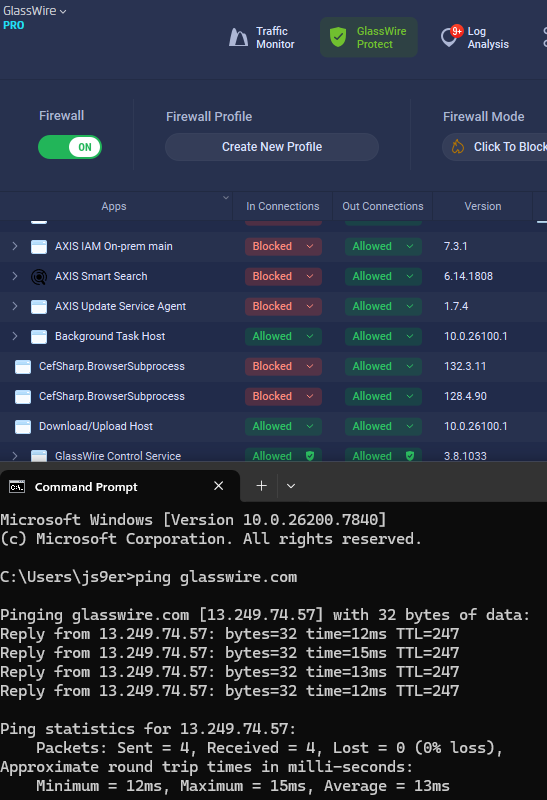
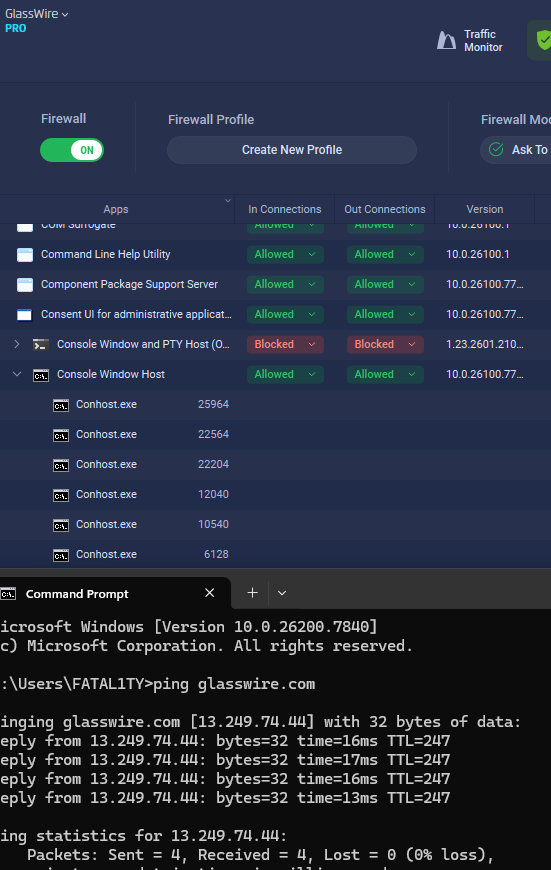
@Ginette In version 3.8 we changed how apps appear in the Protect tab. Apps that have never had any network activity are now hidden from the list. This may be why you’re no longer seeing cmd.exe there. If cmd.exe ever attempts to connect to the network, it should appear in the list at that time.
We made this change to reduce confusion around apps appearing as “Blocked” even though they had never actually attempted a connection. In Ask to Connect mode, apps that hadn’t connected yet used to show up as blocked by default, which led some users to think GlassWire had blocked them automatically.
Also, are you still seeing the “Can’t connect to local server” issue? I just want to confirm, since it sounds like you’re able to see the Protect tab and the apps list.
The “Cannot connect to local server” error still appears but not immediately. After a clean install of GlassWire it usually works at first, then the error shows up after some time, usually between about 5 and 30 minutes, without any specific action triggering it.
I also tested running network commands in cmd.exe such as ping requests to generate network activity, but cmd.exe still does not appear in GlassWire anymore. In previous versions it showed up correctly, but since version 3.8 it no longer appears in the apps list even when it is clearly generating network traffic.