I updated from 3.8.1061 and now I miss the country flags. Reinstelled 3.8.1061 and they are there. Installed 3.9.1102 clean install, but no country flags on the Apps view.
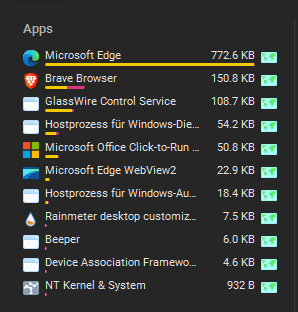
Hi
Yes i have the same issue when installing a new instillation of Version 3.9.1102 on a new PC
I have even had this happen in the past when i was updating to a new version.
My solution was to go back the the version which had no issues with then install the new version over the top but don’t use clean install option.
I even noticed with Version 3.9.1102 It did not show any details under traffic monitor, and then under the Apps, (Tab) I was going to send the issue to support but thought it would be to much back a forth, quicker to do my own troubleshooting which i finally worked out the solution as noted above. Now all is working…
Let me know how you go… because i have found with older version using the “Use Legacy Driver” did seem to also fix problems as well but that’s for another day.
Thanks for your reply. At first, I installed the new version over the old one without deleting the settings. But that gave the same result. Then I uninstalled the new version and reinstalled it, deleting all the settings in the process. The problem still persists, though.
I didn’t see a “Legacy Driver” option when installing the new version.
Hi,
Might be best to just uninstall the version you have giving issues, and if you still have a copy of the version that was working for you install that one again.
The version that had “Use Legacy Driver” was 3.8.1061
You can get here…
I only use that option if i had issues and sometimes it did fix things.
All you can do is test and try different things that work for you.
I went back to version 3.8.1061
Thanks for flagging this! I’ve passed it along to our team and we’re taking a look.
The team just confirmed that this has been fixed and will be part of our next release.
1 Like