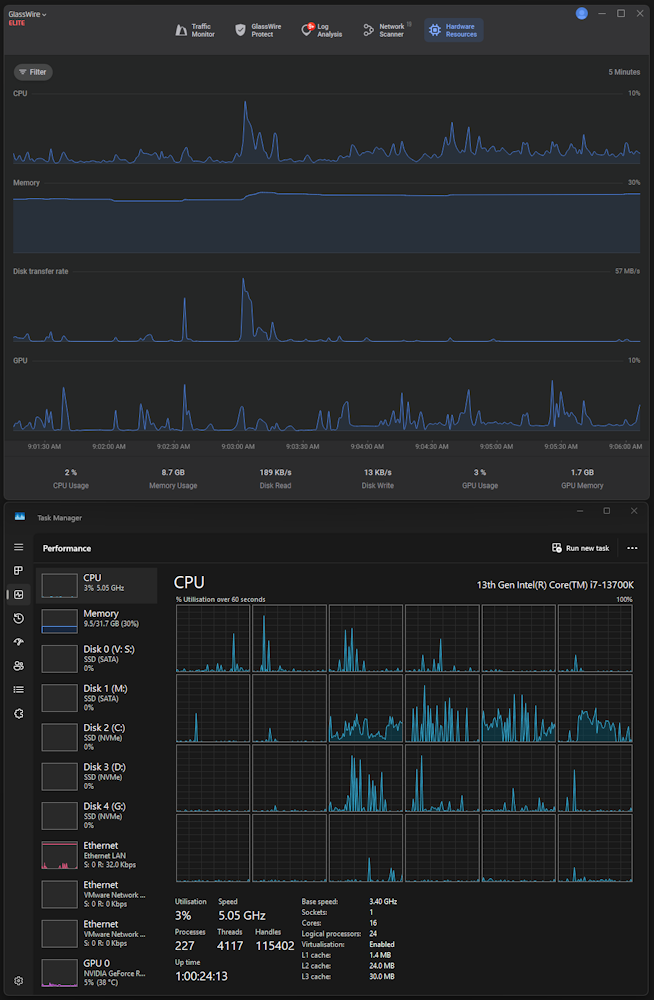
To me it seems that Glasswire Premium is mainly a network monitoring software and the firewall is a secondary feature. Other tools and firewalls, even free of charge ones, can allow / block a app from connecting to the Net but they don’t include the other network security and privacy features that Glasswire Premium provides. I don’t consider hardware resources monitoring because, as user Tarun wrote above, there are around plenty of free softwares that do the same thing. Perhaps this function, not even unselectable, as user Tarun pointed out, also burdens Glasswire because it needs some resources itself.
I was hoping for a bit more control in customizing firewall rules (i.e. domains allow / block per-app, using wildcards in folder paths, a option to auto allow digitally signed executables).
In its current state the Glasswire Premium firewall personally doesn’t make me want to pay 36.00 Euro (35.88 Euro to be precise) every year for a subscription, even if it includes the other network security and privacy features listed on the comparison table here GlassWire Pricing I still continue to frequent this forum hoping that maybe in future some feature will be added to the firewall to make it more customizable but I’m a bit pessimistic because it doesn’t seem that the developers are willing to make substantial changes to it. Other users or potential users already asked in the past more or less for the same features I listed above.
One thing I will say is that the resource monitor is nice when you’re running GlassWire on other devices. Though even then - the layout and ordering of things could be much better.
Thank you all for the feedback. You’re right that GlassWire is first and foremost a network tool. On hardware monitoring, I’d love to hear more: is the main issue that it uses system resources, clutters the UI, or just doesn’t add value for you? Knowing what would make it better will help us decide how to improve it.
On the firewall side, none of your requests are forgotten. Per-app domain allow/block, wildcards in folder paths, and auto-allowing signed executables are all on our roadmap. They just take heavier design and backend work than they look, so we want to get them right.
As @Tarun Mentioned above we have Task Manager built into Windows and others tools at hand so to have hardware monitoring is just not needed, yes it just doesn’t add value. I for one would like to see it removed and just concentrate on other features that are related to the Firewall, Traffic Monitor etc.
Also as @ittroll Mentioned it would be be good to see that roadmap and we could discuss these features and even take a vote on the next feature we all would like first that could be added.
It re-invents the wheel that already comes built into Windows, but with less metrics and configurable options. It has no functionality, you can’t inspect details or kill processes, you can’t even check or modify firewall rules for a given process. In short, a less good Task Manager.
You asked about GW hardware monitoring feedback.
For me I see no benefit from it compared to the windows 11 default task manager. Win 11 has by default Disk/CPU/Ethernet/GPU tabs in the taskmanager.
If I need “specialised” hardware monitoring I would chose specialised software e.g. CPU-Z and so on.
So for specialised use it shows too little and for 0815 use it is inferior to the windows task manager (at least for my taste)
For me, it doesn’t really add any value. @ittroll sums it up quite well. I get more information and control by remoting into said PC and using the relevant tools I mentioned in my first post.
I probably sound like a broken record as much as I talk about this one software firewall that I used, but it really was fantastic and ahead of it’s time. I think it would be a good idea for the GlassWire team to fire up a VM running Windows 7 and install the last version of Agnitum Firewall Pro which was brilliant. I recall one of the last features they had added was ad-blocking for the entire PC, no matter what program you used. Replacing the ads with a 1x1 transparent pixel png image or the text [ad]. It had great filtering. Options to Allow All, Allow Once, Deny Once, Deny All. Even a Game Mode that helped block lots of things with minimal interruptions from the firewall. I could say so much more but it’s really best to check it out in a Windows 7 VM.