Thank you 
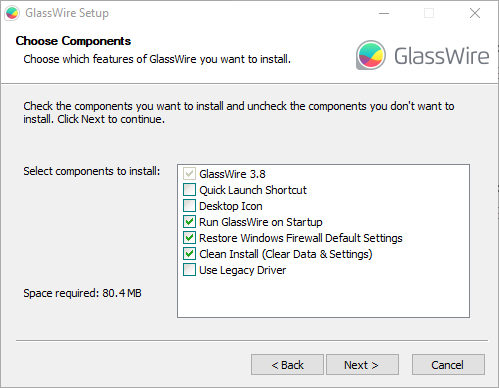
Went for the fresh start option. Fingers crossed.


GlassWire Control Service was still stopped.
Started it.
Still failing to connect to the local server

Checked Service. It has stopped by itself?
Side note: Noticed it installs to Program Files (x86). Wouldn’t GlassWire benefit from being 64bit?
Anyway, tried again. Same problem but this time service still running.
Restarted GlassWire
Still not connecting.
Presume restarting Windows is called for.
————————
Restarted. Still no joy
Full reinstall incoming.
————————
Uninstalled
Restarted Windows
Ran installer as Admin
Same install options as earlier
Did not choose to run glasswire after install
restarted Windows
ffs 
Service was stopped. Started it. Still won’t connect.
Restarted GlassWire, Still won’t connect.
What now?
—————
I have now realised that If you don’t refresh Services, It will still show that the service is running even if it has actually stopped.
I closed GlassWire from the system tray and then started the service. The service seems to stop almost immediately.
Started GlassWire, and then started the service. Refreshed the services window about 5 times. The service stopped before GlassWire reached it’s second connection attempt.
Did you lot vibe code this? 
—————–
Clicked “get help with this issue” in GlassWire. (had to search for “local server”)
If GlassWire’s graph will still not load please check to see if the following Windows services are running in the Windows task manager:
-
WlanSvc (WLan AutoConfig)
-
BFE (Base Filtering Engine)
-
EventLog (Windows Event Log)
————————-
Only WLan AutoConfig was not running. Why not? It’s start up type is manual. Is that how it should be?
I started it, then started GlassWire service.
Refresh…. WLan AutoConfig is still running. GlassWire Service has stopped running.Restart GlassWire
WLan AutoConfig is still running
GlassWire service is not running
Tell GlassWire to connect
Start GlassWire service
Service dies, GlassWire still can’t connectI’m out of ideas here
WTF DID YOU DO!?!?!
I did make a backup (as encouraged), but after 2 hours of wrestling with this, I’m really not in mood to deal with that shiz. Especially as I am in no way confident that it won’t just make matters worse.
Not that I’m sure what could possibly be worse that totally fu**ed, but I’d lay money on the fact that I would only be a few clicks away from finding out.
Hopefully this messy, step by step info dump is helpful in some way.
Please advise on what I should try next.
————————-
Closed GW via the system tray
GW service not running
Copied and replaced files from C:\ProgramData\glasswire\service-full-3.5.bak\service-full
to C:\ProgramData\glasswire\service-full
Ran (as admin) glasswire-setup-3.5.821-full.exe
Same install options as before.
Chose to run GW after install this time. Living life on the edge over here lol
Well slap me on the arse and call me Shirley! It’s up and running without skipping a beat