Try here: Download GlassWire 3.5.821 for Windows | Uptodown.com
The issue seems to be with GlassWire version 3.7.880, which blocks all connections when set to “Ask to Connect.” To fix this:
-
If you’re using version 3.7.880, uninstall it and reinstall version 3.5.821, which works fine.
-
Disable auto-updates to prevent it from upgrading to the problematic version.
-
If you have 3.7.880 installed, try updating it to the latest version after a clean install to see if that resolves the issue.
If it still persists, consider reaching out to GlassWire support for further assistance.
3.8.1033
Clean install, reset windows firewall settings.
Still always asks if I want to allow google updater, dropbox, etc.
I’m so, so tired of this. It’s been going on for years. Please make it stop 
Hi, thank you !
Now I remember that 3.5.821 version didn’t allow for distinguishing between inbound and outbound connections yet. However, for some applications, it is preferable to block incoming connections only.
Version 3.6.859, which I was using just before, allowed for this distinction, but it already forced me to constantly re-authorize apps that had been approved previously (at every update, which can be daily for some). However, it didn’t yet have the drawback of creating multiple entries for the same application in the list.
So there’s no perfect alternative, I guess.
Are there actually any programmers left at GlassWire, or is it just a few community managers replying every now and then to prevent users from starting a class action, all while they keep raking in profits from the last few naive people who still believe there’s something behind GlassWire’s promises?
1 Like
I’m not a GlassWire Premium user but unlike other forums It seems to me that here the developers do not participate to the discussion. This could explain the lack of feedback from them regarding questions from users or potential users like me Feature Request: Path-Based Firewall Blocking for Temporary Files just to give an example
I must say that very rarely I’ve seen softwares that need to be downgraded to solve their issues, even if sometimes it may be the only solution but it should be a temporary fix. It’s not very acceptable, however, especially for paid software.
I think that whatever software, both free and even more so for paid, should be thorougly tested before officially release it.
2 Likes
Hey everyone,
We pushed out a new version yesterday with fixes for a bunch of the issues people have flagged in the forum. No pressure to install it right away if you’re not feeling it, but if you do update and something’s still off, sending your logs over to support would honestly help us out a ton. That kind of detail goes a long way in helping us pin down whatever’s still lingering.
And if you’d rather post here, that works too. Either way, the more specifics you can share, the better.
Thanks for hanging in there with us.
Thanks for the heads up 
Is the About screen supposed to inform of and link to the latest updates?
A direct “Update” button here would be sweet. Now web browser, no manual saving of files. Just auto update.
I’m also tired of unchecking the first 2 options here.
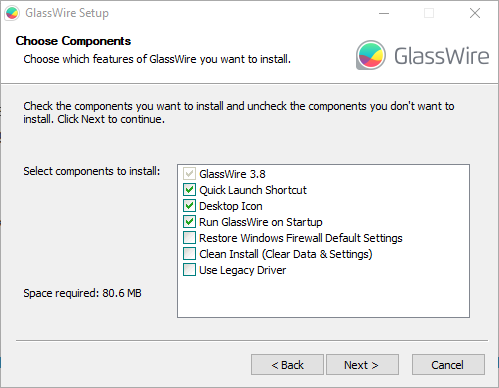
I like a clean Desktop, but these seem like particularly pointless for the type of application that GlassWire is. (Always running and available for the system tray).
If it could recall my previously selected options, then problem solved.
Thanks again 
1 Like
Not sure 3.8.1061 is going to be any better in regards to nagging about obviously safe connections.
As soon as the update was installed it asked if I wanted to allow:
- An already running Windows Remote Desktop session
- Spooler SubSystem
- Host Processes for Windows Services
- Device Association Framework Provider Host.

I’m of the opposite opinion. I’m getting very few Ask To Block notifications in general and only have one process blocked in the Protect tab. I’m very pleased that the Log Analysis tab is much more detailed about the activity on my Windows 11 system. The vast problems on the 880 version seem to have been corrected and I can continue using Glasswire as I have for over 10 years. To each their own.
1 Like
This is intentional. In the previous, much disliked release, a large number of system processes and application were automatically allowed. Now the user choice has been returned for these. Whilst you may regard these are safe, people may have reason to block them.
1 Like
Thanks for the feedback!
Just to clarify on updates, GlassWire does support automatic updates, so in most cases new versions install without any manual steps. If that’s not working as expected on your end, let us know and we’ll dig in.
That said, are you in a situation where you’ve turned auto-updates off and want a way to manually trigger an update from within the app? Just want to make sure we capture it accurately.
On the installer checkboxes for desktop/start menu shortcuts: appreciate you flagging this. Having the installer remember your previous selections is a reasonable ask, especially for a tray-resident app like GlassWire. I’ll share this with the team and add it to our backlog.
So is it safe to update now?
1 Like
The blocking issues from 3.7.880 have been addressed in 3.8, and most users have reported things are back to normal. GlassWire will prompt for connections it hasn’t seen before (like system processes), but that’s intentional, since the old version auto-allowed too much. Once you’ve approved your regulars, it should settle down. If anything feels off, feel free to share your logs with support and we’ll take a look.
2 Likes
I installed the latest update (3.8.1061). It took me a few hours to configure the permissions for each app when prompted (as usual), but now everything seems to be working normally. There are no duplicate alerts like before. We’ll see if GlassWire keeps asking for the same apps later on.
Improvement suggestions:
- It would be great to be able to export settings and import them onto another PC (since a single license can cover multiple PCs).
- As far as I remember, old versions of GlassWire used to have a column for community ratings, so you could see if an app was safe/trustworthy. It’d be awesome to have that back. That way, the community could also give advice on whether it’s actually necessary or dangerous to allow incoming or outgoing connections for certain apps. Alternatively, let app publishers state why these inbound/outbound connections are needed.
1 Like
Hello, I’d like to offer another suggestion. We very often need to search for the name of an executable file on the internet, either to find out what it is, or to ask whether it’s necessary to allow connections (especially inbound connections) for that application. Currently, to do this, you have to click once to show the details, then click the “…” button to open the menu, and click once more on “Copy” or “Search online”.
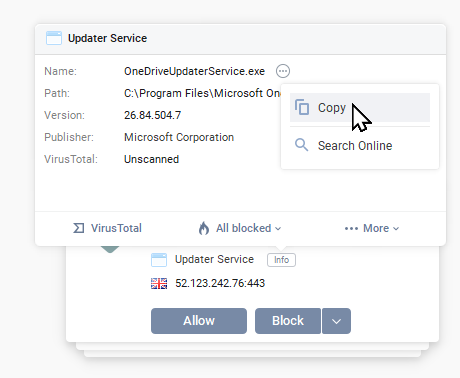
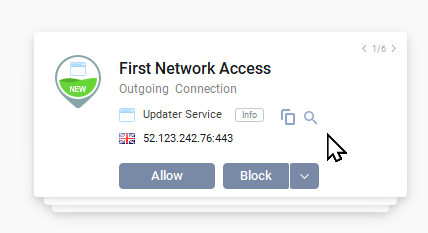
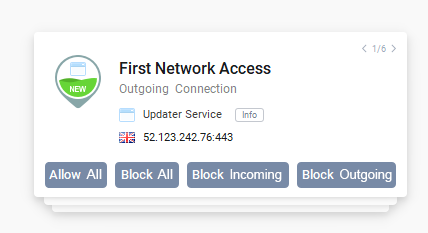
Would it be possible to add the “Copy” (the executable file name) and “Search online” buttons directly next to the application name in the alert? This would save a lot of clicks when receiving a large number of alerts. For example, it could look like that:
And also, could we have the “Block All” and “Block Incoming/Outgoing connections” buttons directly in the alert? For example :
1 Like
This thread is a bit old now but it is a similar issue so:
I have 3.8.1061 and I am getting shadow blocked. I have a game explicitly set to allow in setting but the game is getting blocked. The game in question is Occupy Mars and it will only get online when I set the firewall to allow all. A fresh (CLEAN) install of the firewall was already done and there was no change. There is never a pop up to tell me the game is attempting to connect. I keep the settings on “click to allow”. Looking through all the blocked things… nothing jumps out at me that should be enabled. The games own log says it is making cURL calls but getting no replies back. There are no curls apps listed in the application list on the firewall (and there shouldn’t be since it has been inserted into the app not an external application)
Any help would be appreciated.
netstat -ab
At the command line might help to reveal which process is making the connection. Especially if the game log details the hostname or IP.
However, if a VPN is being used this may be hidden for GlassWIre.
I tried the nestat command but it doesn’t show the game making a connection UNLESS firewall is turned off. I can’t even ping 14fc2.playfabapi.com which the games log says it is trying to reach even when the firewall is off… but the game has no problems when firewall off.
“Curl error 7: Failed to connect to 14fc2.playfabapi.com port 443“ is what the games log shows when firewall is on. When firewall is off the multiplayer works and that line is no longer showed in the logs.
Is it weird that I find the fact that the firewall(windows own firewall) when controlled by glasswire cannot contact a MS owned url playfabapi?
I can’t ping 14fc2.playfabapi.com either (firewall on or off), but that is not unusual, it is quite common for servers to block ICMP for security reasons.
A quick Google suggests that the main executable OccupyMars.exe makes the outgoing connection. Is that listed in your GlassWire Protect tab?
Might also be worth looking at Windows Advanced Firewall and looking for rules which reference \OccupyMars.exe (sort by path). It could be that there are two conflicting rules.