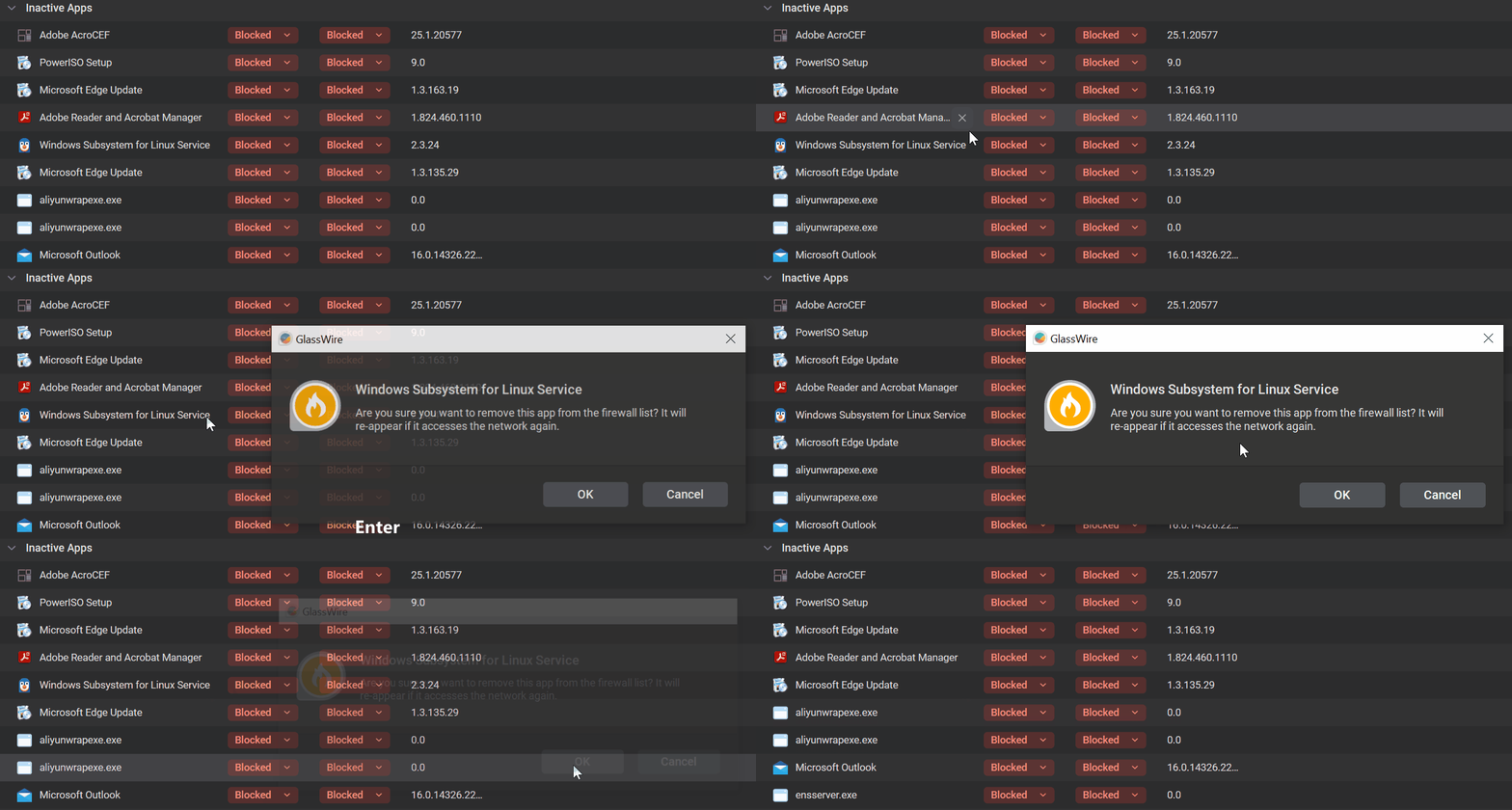
This dialog to delete a rule used to have an autofocus on [OK] button, which made it possible to hit [X] to delete and then press the Enter key, to quickly confirm it.
Without it, it is necessary to use a mouse, making it a huge pain if you want to remove several rules at once.
related: [regression] Can’t quickly remove a firewall rule any more in wrong forum
1 Like
I agree that GlassWire should respect keyboard controls, for better accessibility if nothing else.
But why would you want to delete many (but not all) inactive rules? If the apps are still installed this will just cause them to prompt again.
Bad example. I do the same for some active apps too.
Same question. Why?
I can understand perhaps deleting the odd active or inactive entry .But why would you want to bulk delete? They will just prompt again.
Many apps use “Microsoft Edge View” to display some web content or ads. I usually run such apps isolated so I know what I am allowing/blocking. But sometimes I get multiple prompts being unable to tell which app made the request. Sometimes I later discover that something isn’t working correctly too, but it’s impossible to tell which one of the dozen “Microsoft Edge View” records it is, so I need a way to nuke them all and get prompted again by “Ask to Connect” setting.
Another use case is Dropbox, which releases new version every few days. It’s super annoying to be honest, anyway after some time, it accumulates tens of records in the table and from my previous experience, managing rules gets exponentially longer the more rules there are. I used to experience 15+ minute lags when changing/deleting a rule in the past or just changing the policy from “Ask to Connect” to “Block”. So I want a way to clear those rules.
Sometimes those rules are not properly marked as “Uninstalled apps” or “Inactive apps”, so this doesn’t work either.
I don’t understand why you keep nagging and insist on learning why I need it, instead of acknowledging the fact that it isn’t possible, regardless of the use case and that it sucks.
By understanding what you are trying to achieve I can try to help.
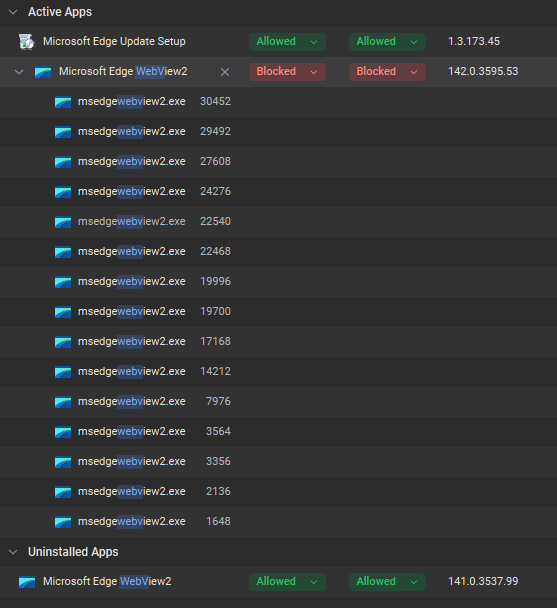
Applications have to be uninstalled before they are added to Uninstalled Apps. In the case of Microsoft Edge View I only ever see one version (the most recent) in the Active Apps section. Only the latest version is active and will be used by all apps that require it. As long as this one is Allowed all apps that need it will work. All the older versions drop into Uninstalled Apps and can be removed with a single click.
I don’t use Dropbox so I cannot comment on that one. But if you are seeing multiple entries in Active Apps then the Dropbox installer musty be leaving old versions on your drive.
Here is a fresh example of Edge WebView from today. A new version has been installed and silently blocked by GlassWire. Under Active Apps there is a single blocked entry with all the process instances listed. The parent process can be identified from the process ID (PID) if you are particularly interested to know what this is. The previous version has dropped into Uninstalled Apps. Allowing the new version will fix all these processes. Bulk delete can be used on Uninstalled Apps to clear all redundant entries.
The WebView case used to be different in older versions of GW as demonstrated here How to see when an app is blocked and actively trying to connect? - #6 by QwertyQQ7
Anyway, regardless of the reason to delete a rule, when you do it, the autofocus on [OK] used to be there and now it’s not and it was damn useful and made working with it much faster and less tedious.
1 Like