I would just install 3.6.859 and disable automatic upgrades till they come up with an solution.
A complete link is provide here
1 Like
Thanks for sharing your experience and I’m really sorry to hear that you’re facing issues as well.
You mentioned that you switched from Ask to Connect to Click to Block mode, and you’re still not getting any prompt. In Click to Block mode, all apps are allowed by default, except the ones that you manually choose to block in the list. You will not get prompted in this mode, but only in Ask to Connect mode.
Also, incoming connections have always been blocked by default when the firewall is turned on, even prior to this version. The bidirectional firewall feature that was introduced in this version came with a new UI that allowed you to see and configure both incoming and outgoing connections, so the difference now is that you can see that incoming connections are blocked by default. To retain the same behavior as before, you don’t have to change the setting of the incoming connections (you can keep them blocked).
What I’m concerned with is that you mentioned that apps are getting silently blocked, which is not the intended behavior. The team is investigating this, but unfortunately, we are not able to reproduce the issue at this time, which is why I’m looking for as much information as I can gather. Can you confirm that it is outgoing connections that are silently blocked and that these are not apps that you have ever blocked before? Please let me know if there are any patterns you see with these impacted apps and if there is any other detail that might be helpful.
I will provide any updates as soon as I have something to share. I appreciate your patience.
@Huda_GlassWire From what I’ve noticed, is that apps are automatically blocked when the firewall has crashed and is not running in the tray. I haven’t looked too far into it, as my time and attention are required elsewhere currently.
So, is this expected behavior or what? I don’t want to keep using an old version forever, and I’ll not be renewing if this is the new norm, as it’s too annoying having to manually open the app and check if stuff is being blocked.
Issue is, it keeps blocking stuff, without a prompt. And even when I allow it, and try to reconnect, it’s still blocked with a new generated listing of the blocked app. This seriously clutters the list with large amounts of duplicates, and makes it so I can’t even connect with the app being blocked. For example, ICUE software. The firewall kept blocking it, and I couldn’t update the program. There was no pop up or nothing. It just blocked it. I then allowed it, but it wouldn’t connect still. Restarted ICUE. Blocked again no popup, and new entry in firewall. Kept doing that over and over. Wasn’t the only issue with connecting, but that one I remember.
This looks like classic trash updates, regression, scope creep, whatever, where you continue trying to “improve” the product with features or updates, which is great if they actually improve things, but here it just made the experience worse or breaks things.
2 Likes
I agree completely. The developers should admit their mistake and remove this version completely. This was definitely a move in the wrong direction. Why degrade an excellent product that has worked flawlessly over many years?
1 Like
I thought I was the only one with this issue:
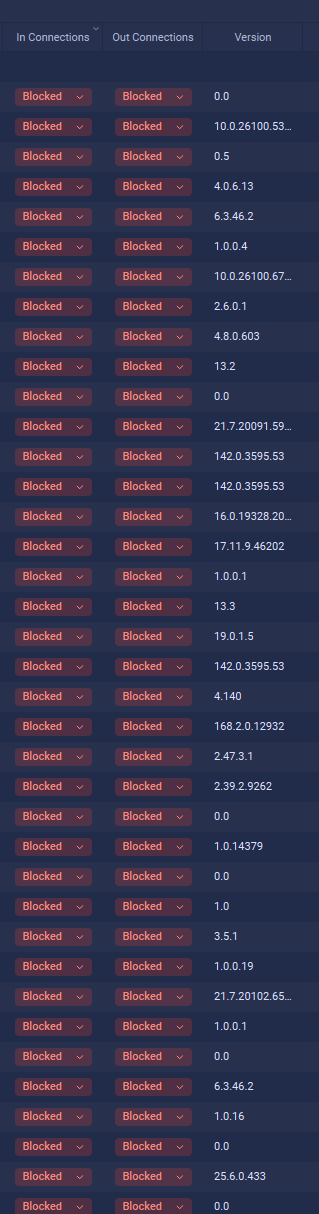
This is not good. I didn’t get a prompt for any of them even though I have “ask to connect” enabled. This is driving me crazy because half of my dev tools can’t connect to the internet and I have to scroll through a massive list to find a process. It’s such a shame because I really like this firewall, but it looks like after few years I will have to look elsewhere. Shame.
3 Likes
I have been researching other alternatives to Glasswire since this problem. Unfortunately, the choices are substandard, and all do not provide the same features. I’ve reverted to an older version of Glasswire as a temporary solution but after following all the postings here, including the company’s replies, I feel we are being deserted by the company in general. They are either unable to solve the problem or might abandon it in the future. Just my opinion.
1 Like
I just uninstalled Glasswire. Same issue as most people.
I thought it was something I did.
It seemed to also be the cause of my Windows Exploere to have an “Application Hang” (Unconfirmed but I think so)
Very dissapointing
i am using a older version of glasswire and will not update till they fix it
1 Like
Yes, very disappointing. It is clearly not “something you did”. Well, I guess you DID install GlassWire and it is GlassWire that is blocking stuff all on its own
To the GlassWire team - as if you have need for more evidence that things are severely broken - I use UniGetUI to keep my apps up to date. Today, it said a new version of Git is available. When I tried to update it, the update failed.

When I clicked for details, I got:
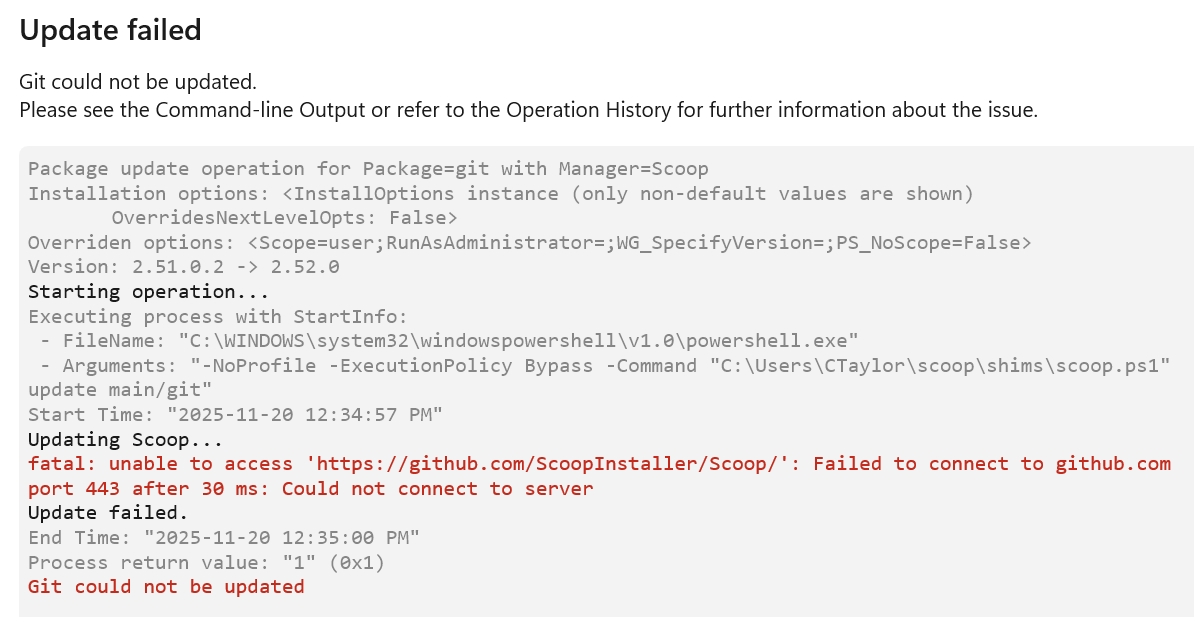
As is now my standard operating procedure, I checked in GlassWire Protect and saw at the top of the “active apps” list

Noting that “scoop” appeared in the error message from UniGetUI when it tried to update Git, I turned off the GlassWire firewall and retried the update to Git in UniGetUI and it completed successfully

For the record, I never specifically blocked “Scoop-search” and don’t recall ever seeing a prompt as to whether I wanted to allow it or not. It was blocked by GlassWire. Silently. Frustratingly.
Is there any timeline for when this persistent problem with 880 will be fixed?
ARRRGGGG…
I unblocked “scoop-search” for outbound and restarted the firewall. As “scoop-search” jumped to somewhere else, I decided to double-check that my unblocking worked. I searched and saw a second “scoop-search” (under a different folder) and it was blocked too

Not knowing which version of “scoop-search” was the cause of Git not being able to be updated by UniGetUI, I have now unblocked this other copy of “scoop-search”
GlassWire: do you really think it is reasonable for you to expect your customers to jump through these hoops to simply use their computer‽‽‽‽‽‽
So which version is the last one before the new UI that f** up everything? I hate it so much.
I believe it was 3.6.859
See the post earlier in this thread from Geri123 on Oct 18 :-). Thanks @Geri123
Yes thats the version I am running now and seems to be ok.
So, for nearly three months now, we haven’t received any fix, update, or even an explanation about what we should expect. As a developer myself, I could understand this kind of behavior from an open-source or ‘hobby’ project provided as is, but not from software with a Premium license.
Please take action and move forward — you have a great app, but this lack of clear communication and updates is undermining your own work.
2 Likes
At this point, I really don’t think they care. Your original post is from August!
I used to rave about GlassWire to my other IT friends. That ended 4 months ago. They see these posts and NOTHING gets fixed. It’s Beyond frustrating.
3 Likes
I’m running 3.5.821 that I reverted to, and have 6 months left on my licence. I’m not going to pay for any more unless something changes. This is highly unprofessional and shows no concern for many users who have supported the software for years. Such a shame. They could at least remove this latest defective version!
3 Likes
Glasswire was once a product I genuinely enjoyed recommending. However, the latest version introduced breaking changes that block numerous applications without user consent, a critical issue that typically warrants a hotfix within 24 hours. I won’t be reinstalling it on my upcoming Windows setup, and I don’t plan to renew my subscription.
2 Likes
100% agree, #metoo 
I actually thought that GlassWire would realize what a problem this is and fix things quickly. 3.7.880 came out in August, and still no word from GlassWire indicating they will change the behaviour. I currently have 103 programs that are showing in “GlassWire Protect as “blocked” for in and out. I have no idea which of them might pop up with a request to connect and which will silently be blocked if they try to access the network. All I know is that I still periodically have programs fail. And I have to guess that they are failing because they can’t access the Internet, and I have to unblock them in GlassWire and try them again.
I have repeatedly provided any information requested by GlassWire.
I want GlassWire to work for me and not against me.
I have given up recommending GlassWire in the security presentations I give.
I have (almost) lost any faith that this will ever be properly addressed. I have a tiny shred of hope left. I don’t know why. They say the best way to relieve the pain is to stop banging your head against the wall…
2 Likes